RoleWorth extension
Chrome Web Store: liveCapture, score, and review job postings from the browser.
RoleWorth's extension captures supported postings, scores the role, and sends the job into your tracker, ranker, or Application Studio. Unsupported flows stop at manual guidance.
Official listing ID: dllegbcjnpkgkpgekaeiknifbnfpdebe. The extension is review-first: it captures and previews, but never submits without explicit approval.
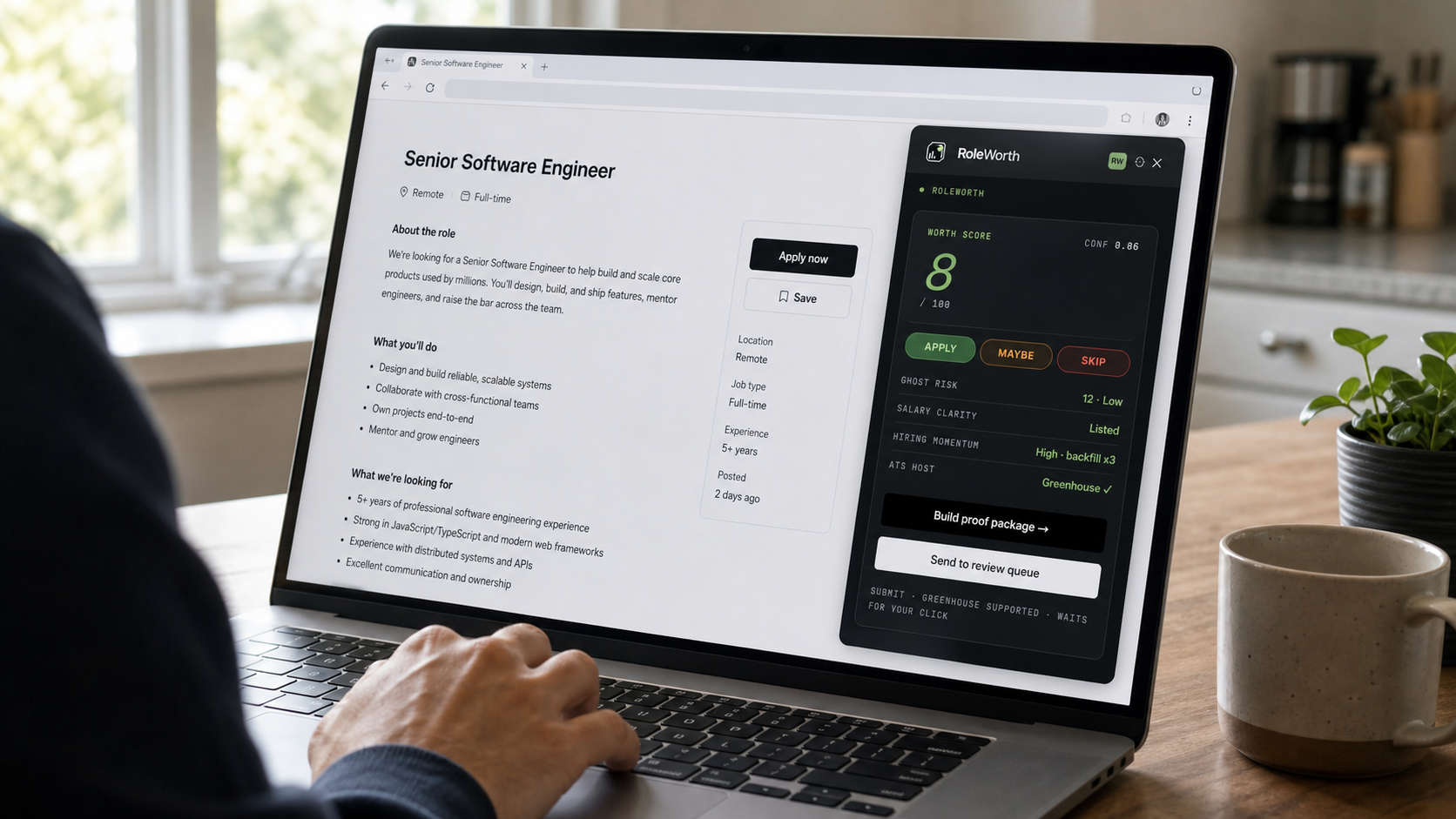
How the extension behaves on a real posting
- 01
Open a job posting on a supported site
Open a supported ATS or job-board posting. The extension checks whether the page can be captured safely.
- 02
Open the RoleWorth side panel
One click on the toolbar icon. The panel extracts the job context and prepares a review-first action.
- 03
Score or save the posting
Review title, company, location, source URL, description, salary if detected, and Worth Score before saving it.
- 04
Review before continuing
Track job, create a resume from the job, send to Jobs Ranker, or open the apply link yourself.
- 05
Manual or supported review handoff
Unsupported or low-confidence flows stop at manual guidance. Submission-adjacent actions require explicit review and product support.
Capture coverage
RoleWorth prioritizes public, structured posting pages where title, company, location, description, and source URL can be reviewed before the job enters your account. Lower-confidence sites stay guided.
| Source | Mode | What happens |
|---|---|---|
| Greenhouse | Capture and score | Posting text, role context, source URL, and review actions surface in the panel. |
| Lever | Capture and score | Role context and source metadata are prepared for Worth Score and tracker review. |
| Ashby | Capture and score | Posting details can be captured, scored, tracked, or sent to Application Studio. |
| Workday | Guided manually | Multi-step session flow where the next field depends on the previous one. We don't drive it end to end. |
| LinkedIn (Easy Apply and Jobs) | Guided manually | In-page modal we don't push answers into. The panel still gives you the right text per field. |
| iCIMS | Guided manually | Employer-specific portals vary heavily. We surface answers; you paste them. |
| SmartRecruiters | Guided manually | Session-bound submission flow. Copy-paste suggestions only. |
| Custom company forms | Guided manually | Unknown structure. We won't auto-fill what we can't verify - copy each field manually. |
Privacy and permissions
Your data stays private - we don't sell or share it. Your Application Kit lives in your RoleWorth account and is loaded into the side panel over HTTPS only when you open it. Read the full policy at roleworth.com/privacy.
sidePanel
Shows the RoleWorth workflow beside the job posting after you open the extension.
activeTab
Reads the active job tab only after your explicit action.
Limited host access
Runs only on listed ATS/job-board domains and RoleWorth API endpoints. No all-URLs permission.
Not requested
No storage, tabs, webRequest, clipboardWrite, or all-URLs permission.
Common questions
- Is the extension live on the Chrome Web Store right now?
- Yes. RoleWorth is live on the Chrome Web Store. Install it from the official listing, then sign in to RoleWorth before capturing or scoring postings.
- Will it submit applications without me?
- No. The extension is review-first. Unsupported or low-confidence flows stop at manual guidance, and submission-adjacent actions require explicit review and product support.
- Why doesn't it work on Workday or LinkedIn?
- Those flows are multi-step, session-bound, or modal-driven. On those sites the extension switches to manual guidance.
- What about my data?
- Your Application Kit lives in your RoleWorth account. The extension fetches it over HTTPS when you open the panel, holds it in memory for the session, and discards it when the panel closes. Your data stays private - we don't sell or share it.
- What permissions does it ask for?
- sidePanel (show the RoleWorth panel beside the posting), activeTab (read the tab you explicitly open the panel on), and scripting (inject the reader only after that user action). It does not request storage, tabs, webRequest, clipboardWrite, or all-URLs access. Host access is limited to supported job boards and RoleWorth endpoints.
- Do I need a paid plan?
- Capture and basic review can stay lightweight. AI generation, deep keyword plans, bulk ranking, application packets, and submission-adjacent review lanes depend on plan entitlement.
Install the extension
Install from the official Chrome Web Store listing, sign in to RoleWorth, then open the side panel on a supported job posting. Unfamiliar sites use guided handoff with copy-paste field help.
Open Chrome Web Store